


Every tournament director has a shared nightmare: It is 8:00 PM, the rented court lights are buzzing, and the venue staff is tapping their watches. Meanwhile, the loser’s bracket semi-final is still in its second game, players are complaining about cold muscles, and total chaos has taken over the scheduling desk.
If you are researching exactly how to set up a pickleball tournament, you will quickly realize that ordering shiny medals and setting up a snack bar is the easy part. The true hallmark of a successful event is time management.
To save yourself from the stress of angry players and massive venue overtime fees, you must build your event around a predictable schedule. If you want to know how to set up a pickleball tournament that finishes before sunset, here is the ultimate 5-step checklist:
- Choose a time-efficient bracket format.
- Calculate the exact "court math" (matches vs. courts).
- Require DUPR ratings for fair, competitive seeding.
- Automate the brackets with dedicated tournament software.
- Enforce ruthless match-day time and warm-up limits.
Let’s dive into the first two foundational steps that will make or break your event before the first ball is even served.
Step 1: Choose the Right Bracket Format
The format you choose dictates your entire schedule. Too many first-time organizers pick a format because it "sounds professional," without realizing the catastrophic time implications it carries.
The Double-Elimination Trap
In traditional double-elimination brackets, a team must lose twice to be knocked out of the tournament. The main winner's bracket plays "Best 2 out of 3," while the loser's bracket (often called the Opportunity Bracket) plays a single game to 15.
While players love this format, it is a logistical trap for organizers. The loser's bracket expands exponentially, creating massive bottlenecks. Furthermore, if the winner of the loser's bracket beats the undefeated team in the Gold Medal match, they force an unpredictable "tie-breaker" match that adds another 30 minutes to your day. If you have fewer than 8 courts at your facility, do not run a double-elimination tournament. It is a guaranteed recipe for running hours behind schedule.
The Round-Robin Solution
For local communities, charity fundraisers, and mid-sized club events, the "Round-Robin into Single Elimination" format is the holy grail of tournament planning.
In this format, players are divided into small pools (e.g., groups of 5 or 6 teams). Every team plays each other once. To keep the clock moving, these pool-play matches are strictly set as one single game to 15 points (win by 2). Once the round-robin is over, the top two teams from each pool advance to a single-elimination medal bracket.
This format is universally beloved because it guarantees every team gets a solid number of matches (making their entry fee feel worthwhile), but the single-game format ensures the tournament director knows exactly when the pool play will end.

Step 2: The "Court Math" – Budgeting Your Time
A tournament is not a sporting event; it is a mathematical equation. You must know exactly how much inventory (court time) you have before you start selling tickets (entry fees).
How Long Will Each Match Actually Take?
As we detailed in our comprehensive guide on how long a pickleball game lasts, time fluctuates based on skill and scoring format. However, when scheduling a tournament, you cannot afford to guess. You must budget using these strict industry standards:
- Best 2 out of 3 to 11 (Main Brackets): Budget 45 to 60 minutes per match. This accounts for warm-ups, time-outs, side switches, and a potential third tie-breaker game.
- One Game to 15 (Round-Robin/Loser's Brackets): Budget 25 to 30 minutes per match.
- One Game to 11 (Consolation): Budget 15 to 20 minutes per match.
The Golden Ratio (Matches vs. Courts)
Let's say you have rented a facility with 4 pickleball courts for an 8-hour day.
Using the round-robin format (30 minutes per match), one court can realistically process 2 matches per hour.
With 4 courts, your facility has a maximum capacity of 8 matches per hour.
Over an 8-hour day, your absolute maximum inventory is 64 matches. When you map out your brackets, if your total match count hits 75, you are mathematically guaranteed to run past your facility rental time.
Do not get greedy. It is incredibly tempting to accept a few extra registrations to boost the tournament's revenue or charity donation pool, but overbooking your courts by even 10% will create a snowball effect of delays that ruins the player experience.
Step 3: Registration and DUPR Integration
A tournament that runs on time requires matches to be competitive and predictable. If you allow players to manually guess their skill level (self-rating), you will inevitably face the plague of "sandbagging"—where advanced players drop down to beginner brackets to win easy gold medals. Not only does this ruin the fun, but wildly mismatched games completely disrupt the natural flow of your schedule.
Why You Must Require DUPR
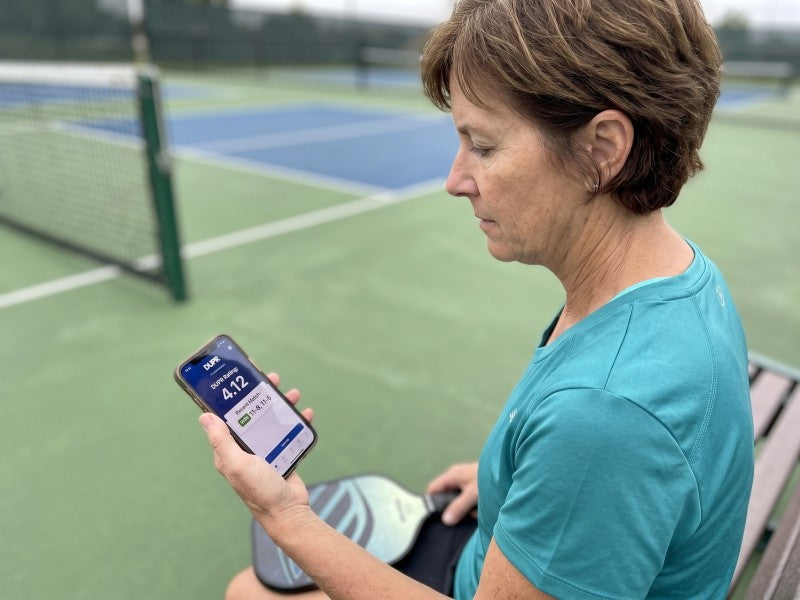
As we detailed in our comprehensive guide on What is DUPR, the Dynamic Universal Pickleball Rating is the gold standard for skill assessment. When setting up your tournament registration, make a verified DUPR account mandatory for all participants.
By using DUPR, you ensure that all the 3.5 players are actually 3.5 players. This guarantees highly competitive, evenly matched games that fit perfectly into your 30-to-45-minute estimated time blocks. If you use the official DUPR club software, tournament results are automatically uploaded to the global database, giving players a massive incentive to sign up for your event.
Setting Clear Deadlines
Organizers often leave registration open until the night before the event to squeeze in a few extra entry fees. This is a fatal scheduling error. You must close registration at least 7 days before the tournament begins.
You need a full week to manually review the entries, balance the pools, generate the brackets, and publish the start times so players know exactly when they are expected to show up.
Step 4: Choose the Right Tournament Software
If you are trying to run a 100-person tournament using a clipboard, a whiteboard, and a megaphone, you are going to fail. In 2026, tournament management software is cheap, highly accessible, and absolutely mandatory for keeping your event on schedule.
Ditch the pen and paper and utilize platforms like Pickleball Brackets, Swish, or the DUPR App's built-in event manager.
The Core Benefits of Automation:
- Automated Notifications: Instead of screaming names into a megaphone, the software automatically sends an SMS text message or push notification to the players saying: "John and Sarah, please report to Court 4 immediately."
- Player-Entered Scores: The biggest bottleneck at any tournament is the scoring desk. Modern software allows the winning team to input the final score directly on their smartphones before they even walk off the court. The software instantly updates the bracket and pings the next two teams to take the court, completely eliminating the line at the director's tent.

Step 5: Match Day Logistics – Be Ruthless with the Clock
You have chosen the right format, done the court math, and set up the software. Now it is match day. As the Tournament Director, your primary job is no longer customer service; your job is protecting the clock.
The 3-Minute Warm-Up Rule
Players love to treat tournament warm-ups like a full practice session. If 40 teams take an extra 5 minutes to stretch and dink on the court, your tournament will immediately fall two hours behind schedule.
Enforce a strict 3-minute warm-up rule. Have your volunteers blow a whistle when the 3 minutes are up. If players want to stretch or hit practice balls, they must do it outside the venue fences before their match is called.
Implement a "Point-Penalty" for Lateness
When a match is called, the clock starts ticking. If a team is nowhere to be found because they went to their car or are standing in line at a food truck, you cannot pause the tournament for them.
The standard industry rule:
- If a team is 5 minutes late to their assigned court, they start the game down 0-5.
- If they are 10 minutes late, they automatically forfeit the match.
While it feels harsh to enforce, handing out one strict penalty early in the morning sends a shockwave through the venue. Word will spread, and suddenly, every player will be waiting right outside their courts before their names are even called.
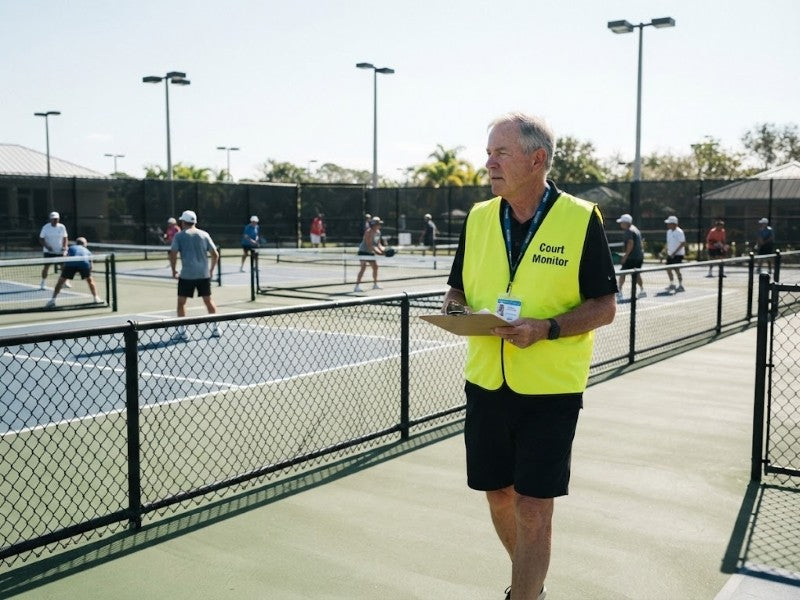
Appoint "Court Monitors"
The Tournament Director must remain anchored at the main desk to oversee the software and handle disputes. You cannot be running around the venue. Instead, assign 2 to 3 volunteers as "Court Monitors." Their sole job is to walk the aisles, visually confirm that assigned courts are occupied, hand out the official tournament balls, and politely pressure players to start their matches if they are lingering.
Frequently Asked Questions (FAQs)
How many pickleballs do I need to buy for a tournament?
Because outdoor pickleballs frequently crack or warp during high-intensity play, you need a healthy surplus. The general rule of thumb is to budget 2 to 3 new balls per match. If you are hosting a standard 100-player weekend tournament, you should purchase a bulk box of at least 70 to 100 high-quality balls (such as the Franklin X-40 or Dura Fast 40).
Do I need insurance to host a pickleball tournament?
Yes. If you are hosting the event at a public municipal park, the city will almost certainly require you to provide a Certificate of Insurance (COI) proving you have general liability coverage. Many tournament software platforms and national organizations (like USA Pickleball) offer affordable, short-term event insurance for organizers.
How much should I charge for tournament entry fees?
Pricing depends heavily on your region and the amenities provided (t-shirts, medals, prize money). However, the standard amateur tournament pricing model currently features a $40 to $65 base registration fee, plus an additional $10 to $20 per event (e.g., $50 to enter, plus $15 for Men's Doubles and $15 for Mixed Doubles).

Leave a comment
This site is protected by hCaptcha and the hCaptcha Privacy Policy and Terms of Service apply.